
table of contents
A cloud access review only works when it keeps pace with how people actually use access. If reviews happen as one-off spreadsheets, gaps stay hidden and audit season gets messy.
A better cloud access review workflow ties identity data, business ownership, and removal actions into one routine. That matters across AWS, Azure, GCP, and SaaS because privilege creep moves fast in shared environments.
The goal is simple: review the right access, at the right time, with proof. The steps below keep the process practical for security, IAM, and IT teams.
Define the review scope and owners
Start with a full inventory. Include human users, service accounts, workload identities, federated roles, groups, and SaaS app entitlements. If you skip machine identities, half the risk stays invisible.
Then assign ownership. Every access package should have a business owner, a technical owner, and a backup reviewer. That split supports separation of duties and keeps approvals tied to real job needs.
Joiner-mover-leaver events should trigger reviews too. New hires need baseline access. Role changes need delta checks. Departures need immediate removal. For a useful primer on review basics, see this foundational guide to cloud user access reviews.
Also define risk tiers. Privileged admin roles, production access, and data-export rights need tighter review windows than low-risk read-only access. The more sensitive the role, the shorter the approval cycle.
Turn the process into a repeatable workflow
A good workflow feels boring. That is a compliment. The fewer surprises, the better the audit trail.
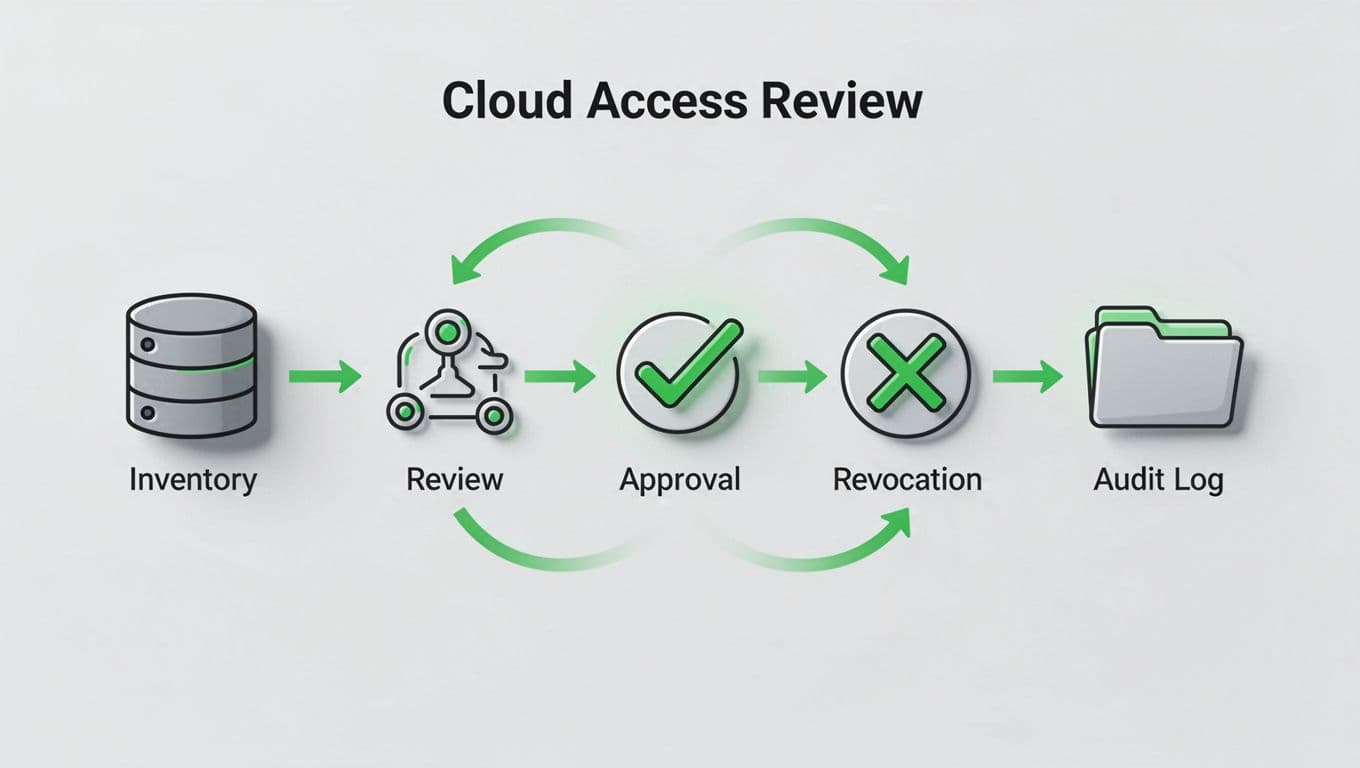
Build the review in a fixed order:
- Pull a current access snapshot from each system.
- Send it to the right reviewer, usually a manager plus app owner.
- Ask a plain-language question, should this person still have this access?
- Record approve, revoke, or exception, with an expiry date if needed.
- Push removals back into the source system and save the proof.
If a reviewer can’t explain the access in one sentence, it probably needs a closer look.
That last step matters most. A review without remediation is just paperwork.
Run these campaigns on a schedule. Quarterly works well for privileged access. Semiannual reviews fit lower-risk roles. Trigger an immediate review after major org changes, project exits, or repeated access changes.
Match the workflow to each cloud platform
The control points differ by platform, so the evidence should too. For a broader view of platform differences, this multi-cloud IAM comparison is a helpful reference.
A simple matrix makes the review queue easier to run:
| Platform | What to review | Native controls |
|---|---|---|
| AWS | IAM roles, groups, access keys, Identity Center assignments, public or unused access | IAM Access Analyzer, CloudTrail, IAM Identity Center |
| Azure | Entra ID group membership, PIM roles, app roles, guest users | Access Reviews, Entitlement Management, Conditional Access |
| GCP | IAM bindings, service accounts, workload identities, org-level grants | IAM Recommender, Security Command Center, Policy Analyzer |
| SaaS | User groups, app roles, external collaborators, old integrations | SCIM, app audit logs, identity governance platform |
AWS reviews often need special attention on access keys and cross-account roles. Azure teams should watch guest users and privileged role assignments. GCP usually needs close review of service accounts and broad org-level bindings. SaaS apps, meanwhile, need clean identity sync and clear ownership for every admin role.
If you want a deeper technical reference for policy design, the updated 2026 cloud IAM best practices article adds useful platform detail.
The pattern is the same, but the proof changes by system. That difference matters during audits.
Automate evidence, exceptions, and remediation
Manual reviews slow down fast. Automation keeps the workflow moving without losing control.

Use identity governance tools to launch campaigns, route approvals, and log decisions. Connect them to HR and ITSM systems so JML events open review tickets automatically. In many environments, inactive access should expire after 30 to 90 days unless the owner renews it.
Keep the evidence pack small and consistent:
- Access snapshot at the start of the campaign
- Reviewer name, decision, and business reason
- Revocation ticket or automated change log
- Exception expiry date and follow-up check
Exceptions need strict handling. If access must stay in place, set a date for re-approval and a senior owner for escalation. Long-lived exceptions turn into hidden privileges very quickly.
For AWS, CloudTrail and IAM Access Analyzer support your audit trail. In Azure, Access Reviews and Entitlement Management help close the loop. In GCP, IAM Recommender and Security Command Center can flag excess privilege. SaaS apps should feed audit logs into the same evidence store.
If your team needs help building the operating model or filling IAM skill gaps, Book a Discovery Call with Bud Consulting.
Keep the review loop alive
A strong cloud access review workflow does three things well. It knows who owns access, it checks the right systems, and it leaves a clear trail behind every decision.
When JML events, periodic recertification, and cloud-native controls all feed the same process, reviews stop feeling random. They become part of normal operations, and audits get much easier to defend.




