table of contents
Annual reviews miss too much. Controls drift, cloud assets change, and small gaps pile up fast. That’s why continuous monitoring consulting matters when you need ongoing visibility, not another one-time assessment.
The hard part is choosing the right setup. Software can collect signals, but consulting turns those signals into a working program your team can run. The sections below show how to scope the work, compare options, and build a setup that holds up in 2026.
What continuous monitoring consulting should cover
Good continuous monitoring consulting starts with governance, then moves into operations. It should define what you monitor, who owns each control, how alerts move, and how reporting reaches leaders.
That matters because current expectations are stricter. NIST still frames information security continuous monitoring as an ongoing discipline in SP 800-137, and FedRAMP’s continuous monitoring overview puts the same idea into practice for cloud programs. In 2026, that mindset is showing up well beyond federal work.
A solid engagement usually delivers:
- A scoped monitoring plan tied to your business and compliance goals
- An asset inventory with owners and criticality levels
- Control mapping that links evidence to each requirement
- Alert rules, thresholds, and escalation paths
- Reporting that works for operators, auditors, and executives
- A review cycle for tuning, exceptions, and program growth
If the provider gives you dashboards but no escalation path, you have visibility without control.
The setup sequence that keeps the project clean
The cleanest programs follow a simple order. First, define the scope. Then build the inventory. After that, map controls, set alerts, and decide how issues get handled.
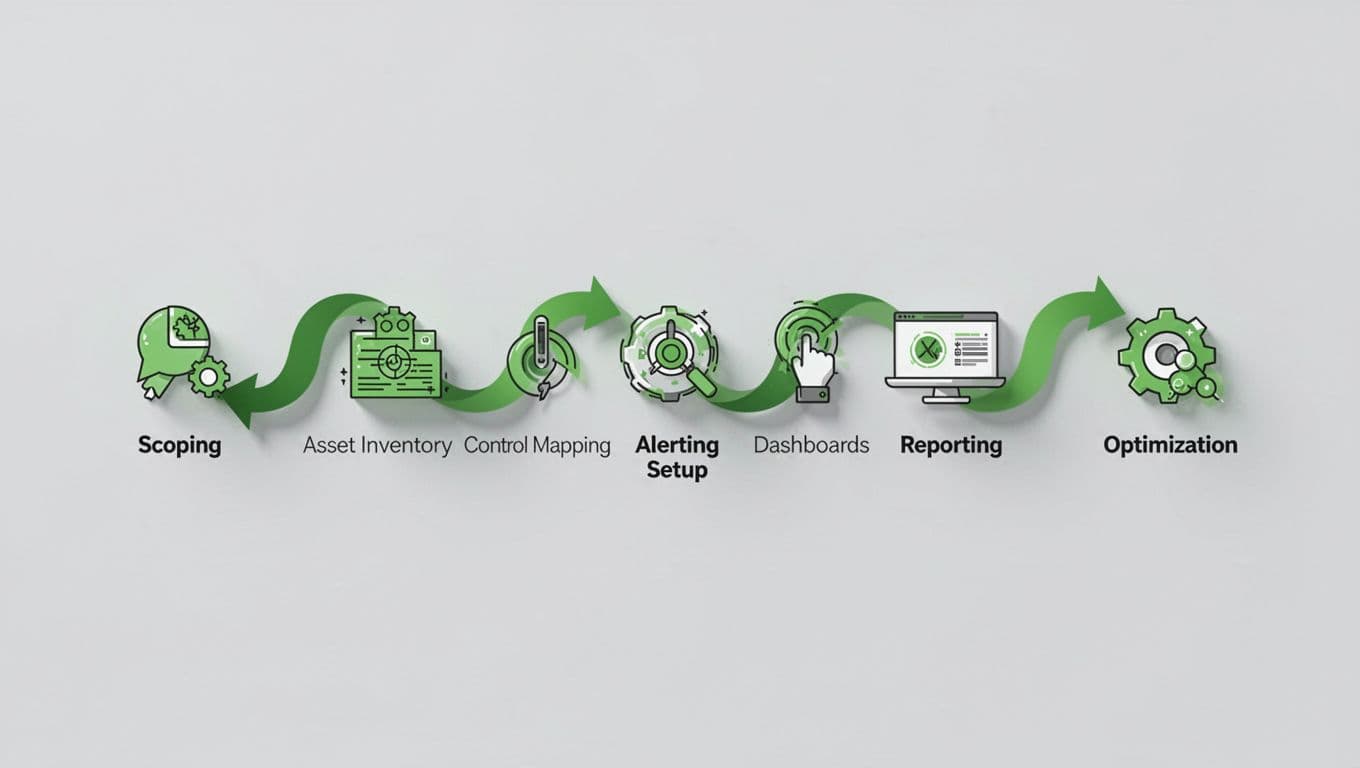
A practical rollout usually looks like this:
- Scope the environment
Decide which business units, cloud accounts, apps, endpoints, and vendors are in scope. Tie that scope to the frameworks you care about, such as NIST, SOC 2, ISO 27001, or FedRAMP. - Build the asset inventory
Use authoritative sources, not guesses. Pull data from cloud platforms, CMDBs, identity tools, scanners, and ticketing systems. Every asset needs an owner. - Map controls to evidence
Match each control to a log source, config check, ticket, or scan result. This step keeps reporting from becoming a manual scramble. - Set alert logic and thresholds
Decide what matters enough to wake someone up. A missing patch, expired certificate, failed backup, or risky permission change may all need different paths. - Design dashboards and reports
Give executives a simple risk view. Give operators a work queue. Give auditors the evidence trail they need. - Test escalation and refine
Run a tabletop exercise, then watch where alerts stall. Adjust thresholds, close gaps in ownership, and cut noise before the program goes live.
A recent view of continuous monitoring in regulated industries makes the same point. The program matters more than the tool.
Software buys speed, consulting buys control
Many teams start by shopping for software. That makes sense, because tools are useful. However, software alone rarely solves ownership, reporting, or response.
Here’s the difference in plain terms:
| Need | Monitoring software | Consulting service |
|---|---|---|
| Collect data | Yes | Helps define sources and coverage |
| Normalize evidence | Sometimes | Designs the process and checks quality |
| Map controls | Limited | Builds the control model |
| Tune alerts | Basic rules | Sets thresholds and reduces noise |
| Create reports | Auto-generated output | Turns output into audit-ready narratives |
| Run the program | No | Establishes the operating model |
That table tells the story. Software is the engine. Consulting is the mechanic, driver, and route planner.
When you compare providers, ask what they do after the platform is live. Some firms focus on software implementation. Others, like providers that package continuous monitoring services, may also help with reporting and program design. The best fit depends on how much internal capacity you already have.
What to look for in a provider
The right provider should sound specific, not vague. If they can’t explain how they handle ownership, escalation, and monthly review, keep looking.
A strong selection checklist includes:
- Experience with your framework and industry pressures
- Clear examples of control mapping and evidence handling
- Tool-agnostic advice, not a push for one platform
- A real alerting model with named response paths
- Reporting templates for leaders, auditors, and operators
- Ongoing optimization after launch, not only setup
Current 2026 programs also need broader coverage. AI use, vendor risk, cloud changes, and executive accountability now affect monitoring scope in many organizations. A provider should know how to fold those risks into the process without bloating it.
If your team needs help building the plan and staffing the work, Book a Discovery Call with Bud Consulting and map the first 90 days before you buy the wrong tool.
Where the model pays off fastest
Continuous monitoring consulting pays off fastest when the cost of delay is high. That includes cloud providers preparing for FedRAMP, SaaS teams with fast release cycles, healthcare firms with many third-party tools, and operations teams that need cleaner board reporting.
It also helps after a merger, during a tool sprawl cleanup, or when audit findings keep repeating. In each case, the goal is the same, steady control visibility with fewer surprises.
The best programs do one thing well. They turn constant change into a process your team can actually run.