table of contents
Legacy authentication protocols linger in many networks. You know the ones: NTLM for old file shares, LDAP binds without signing, Kerberos tickets with weak RC4 encryption. These create open doors for attackers. In 2026, with Microsoft pushing to disable NTLM by default, it’s time to act.
CTEM workflows offer a structured way to find, fix, and watch these risks. They turn reactive patching into ongoing control. Security teams reduce exposure without ripping out every old app at once.
This post walks through practical steps tailored to your environment. You’ll get workflows for discovery, validation, prioritization, remediation, and monitoring. Plus, tips to align your teams during the shift.
Discovery: Uncover Hidden Legacy Authentication Usage
Start with discovery. Map where legacy auth runs in your network. Tools like enhanced NTLM auditing in Windows 11 24H2 and Server 2025 log every fallback. Enable it via Group Policy. You’ll see events for local logins or spots without domain controller reach.
Focus on common culprits. NTLM pops up in apps like PaperCut or old printers. LDAP unsigned binds happen on domain controllers serving queries. Kerberos misconfigs show in RC4 tickets, which Microsoft retires this year. Scan with PowerShell scripts or agents from your EDR platform.
Run weekly scans. Target domain controllers first, then workstations and servers. Output a simple inventory: protocol, host, app, traffic volume. This baseline shows 80% of risks in the first pass.
For deeper insight on NTLM fallbacks, check Microsoft’s NTLM evolution blog. It details new auditing features.
Combine active and passive methods. Active probes simulate binds; passive listens on ports 445 for SMB/NTLM, 389/636 for LDAP. Tools like BloodHound map paths from these protocols to high-value assets.
Expect surprises. Hard-coded credentials in scripts or outdated SSO might surface. Document them all. This phase takes days, not weeks, if you prioritize crown jewel systems.

The diagram above shows a typical discovery scan. Arrows highlight probes on legacy icons. Use this visual to brief stakeholders.
Validating Exposures: Test Real Attack Paths
Discovery gives a list. Validation confirms if attackers can exploit it. Simulate paths without harm. For NTLM, test relay attacks. A workstation sends auth to a rogue server; it relays to your domain controller for escalation.
Use Responder or ntlmrelayx in a lab. From there, grab a Kerberos ticket for silver tickets. LDAP unsigned binds let credential dumps via simple queries. Test with ldapsearch: unsigned traffic exposes hashes if signing lacks.
Kerberos gaps include pre-auth disabled on service accounts. Attackers offline crack tickets. Outdated SSO, like SAML 1.1, skips MFA. Hard-coded creds in configs fail basic checks.
Prioritize validation by impact. Does the path reach admins? Measure success rate. In 2026, best practice mandates phishing-resistant auth tests here.
Document failures. Note mitigations like SMB signing. This proves exposure, not just theory.
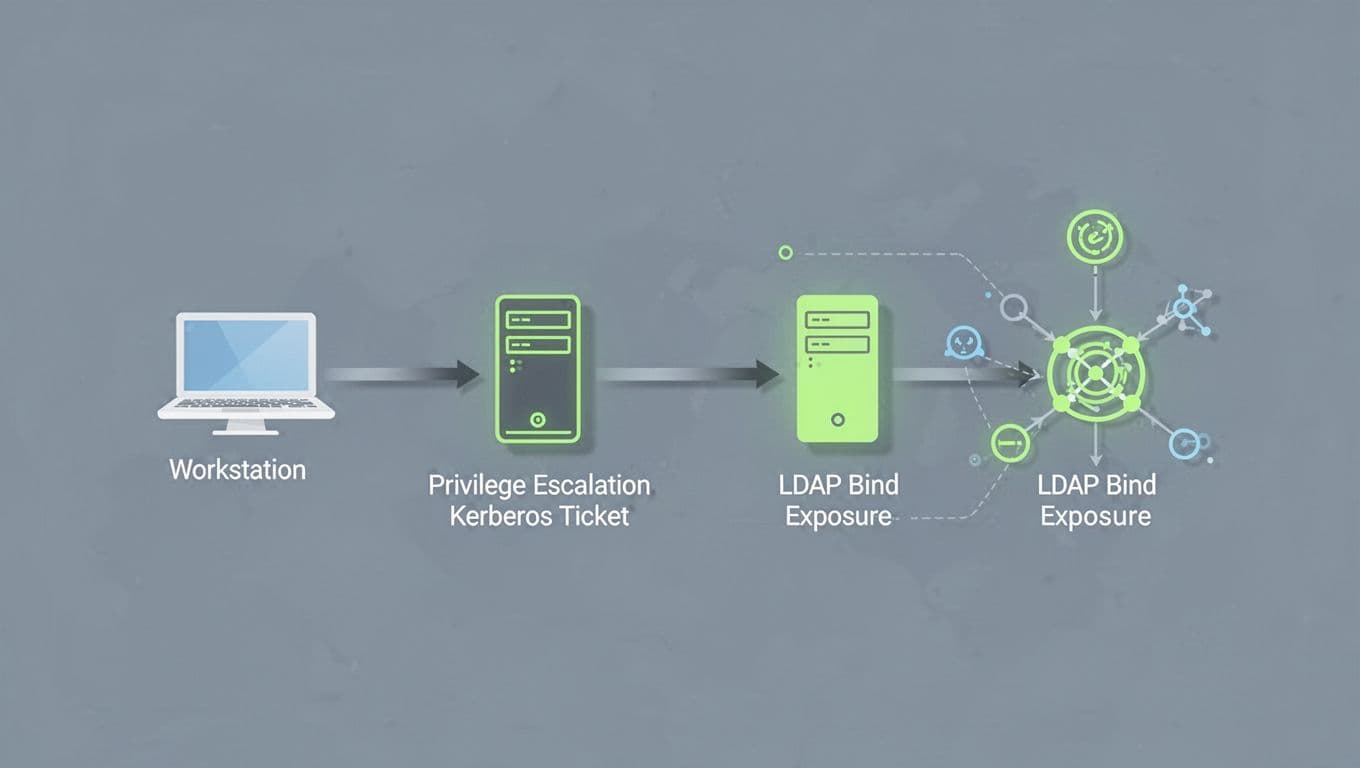
Attack paths like the one illustrated chain NTLM relays into Kerberos escalations. Validate these in isolated segments.
Expect 20-30% false positives from scans. Hands-on tests clear them. Integrate with your red team playbook. Results feed prioritization.
Prioritizing Risks: Focus on What Hurts Most
You have validated exposures. Now score them. Use a risk matrix: likelihood times impact. NTLM relay on domain controllers scores high-high. LDAP binds on public-facing servers follow. Kerberos RC4 tickets rate medium-high due to coming deprecation.
Factor business context. Legacy MFA gaps in old VPNs amplify if remote work relies on them. Hard-coded creds in CI/CD pipelines top the list for dev teams.
Build a table for clarity.
| Risk | Likelihood | Impact | Score | Example Path |
|---|---|---|---|---|
| NTLM Relay | High | High | 9 | Workstation to DC escalation |
| Unsigned LDAP | Medium | High | 6 | Query dump to hash crack |
| Kerberos RC4 | High | Medium | 6 | Ticket replay offline |
| Outdated SSO | Low | High | 3 | Bypass to app access |
| Hard-coded Creds | Medium | Medium | 4 | Script to DB pivot |
High scores first. Assign owners: IAM for protocols, infra for apps.
In 2026, tie to frameworks like NIST CTEM. Weight by exploit trends; NTLM tops lists.

This matrix places NTLM relay in the red zone. Adjust axes for your data.
Review quarterly. New apps or patches shift scores. This keeps efforts targeted.
Remediation: Orchestrate Fixes Step by Step
Fixes start small. For NTLM, force Kerberos first via GPO. Set “Network security: Restrict NTLM: Audit All.” Pilot deny in low-risk OUs.
LDAP needs signing. Enable on DCs: default in Server 2025. Clients follow via policy.
Kerberos: Switch to AES encryption. Fix clocks and DNS for ticket issues. Use IAKerb for no-DC scenarios.
Outdated SSO: Migrate to OIDC or SAML 2.0. Rotate hard-coded creds to vaults like CyberArk.
Legacy MFA: Layer passwordless where possible. Test in prod shadows.
Orchestrate with tickets. Security validates post-fix. Close loops fast.
Quick wins cut risks 80%. Full NTLM disable follows hardening.
For LDAP configs across tools, see Control-M’s authentication guide.
Track progress. Metrics: auth events dropped, tests passed.
Continuous Monitoring: Watch for Drift and New Risks
Remediation ends. Monitoring sustains it. Dashboards track NTLM usage trends. Alerts fire on unsigned LDAP or RC4 tickets.
Use SIEM rules. Query event logs daily. Integrate EDR for auth anomalies.
Set baselines. NTLM under 5% triggers review. Kerberos pre-auth failures prompt checks.
Automate reports. Weekly emails to IAM and SOC. Annual full audits align with compliance.
In 2026, passwordless trends demand monitoring FIDO2 adoption.

Dashboards like this track NTLM drops into green zones. Angle views hide details but show trends.
Scale with agents on endpoints. Catch new legacy apps early.
Aligning Security, IAM, and Infrastructure Teams
CTEM workflows bridge silos. Security spots risks; IAM owns protocols; infra runs apps.
Hold joint workshops. Use shared dashboards. Define SLAs: discovery in 48 hours, fixes in 30 days.
Modernization roadmaps unite efforts. Start with NTLM phase-out pilots. IAM leads Kerberos tweaks; infra updates servers.
Cross-train. Security learns app constraints; others grasp threats.
This alignment speeds modernization. Teams own outcomes together.

Collaboration scenes like this show teams mapping migrations. Handshakes seal commitments.
If gaps persist, book a discovery call with Bud Consulting. They help source IAM talent for these shifts.
Key Takeaways
CTEM workflows tame legacy auth risks. Discovery maps the mess; validation tests paths; prioritization targets hits; remediation delivers wins; monitoring locks it in.
Teams aligned cut migration pains. Start audits today. NTLM phase-out looms; your network stays ahead.
Expect fewer breaches. Safer identities follow.