
table of contents
You’ve just pushed a major app release to production. Users flock to the new features. But did that update break your security controls? One slipped configuration can invite attackers.
App releases often tweak code, configs, or infrastructure. Controls like MFA or rate limiting might still exist. Yet they fail silently in live traffic. You need quick validation to catch issues before exploits hit.
This guide walks you through practical steps. Start with high-risk areas. Then test in production-like setups. You’ll get checklists and scenarios tailored for DevSecOps teams.
Prioritize High-Risk Controls First
Focus on controls that guard your crown jewels. Attackers target identity first, then data access. So rank by impact.
High-risk items top the list: SSO, MFA, RBAC, and API authorization. A broken SSO lets anyone impersonate users. Next come session management and rate limiting. These stop brute force and floods. Base layers include logging, alerting, and backups. They detect and recover from issues.
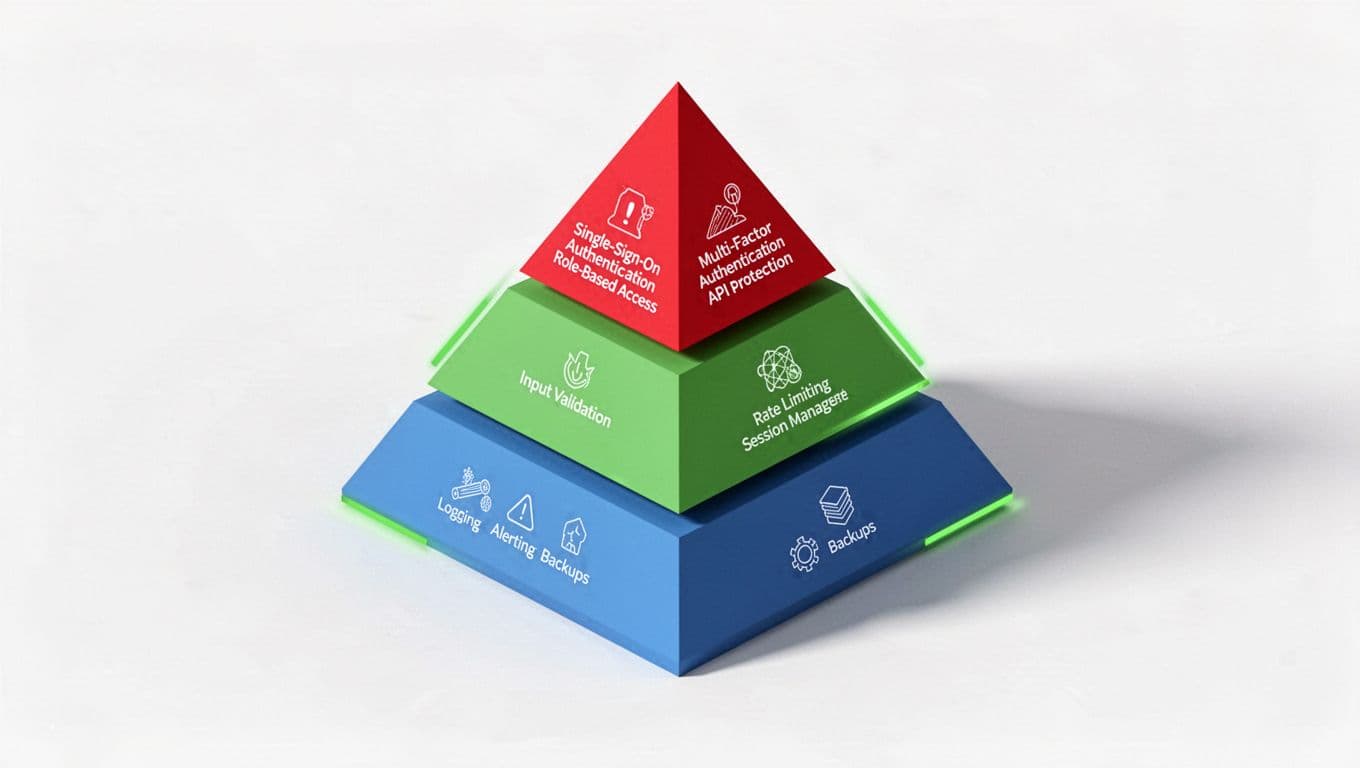
Picture a pyramid. Red at the top signals urgent checks. Why prioritize? Because 80% of breaches tie to identity or access flaws. Scan your app’s threat model. Pick the top five controls that block your main risks.
In cloud-native setups with containers, also check WAF rules and secrets handling. IaC changes from the release might expose keys. Test these before low-risk items. This cuts your validation time in half. As a result, you sleep better post-release.
Distinguish Control Existence from Effectiveness
Many teams check if a control “exists.” Code reviews confirm MFA code is there. But does it block real attacks in production?
Existence is easy. Effectiveness needs stress tests. Fire simulated attacks at staging mirrors. Use tools that mimic exploits. For example, does RBAC deny unauthorized API calls under load?
Here’s a quick checklist for existence vs. effectiveness:
- SSO/MFA: Exists if login prompts it. Effective if bypass attempts fail (test with invalid tokens).
- RBAC: Exists in policy files. Effective when low-priv users hit forbidden endpoints (expect 403s).
- Input validation: Exists in sanitization functions. Effective against SQLi payloads in live forms.
- Rate limiting: Exists in middleware. Effective if 100 requests/second trigger blocks.
Run these post-release. Tools like AttackIQ platforms help automate this. They reveal drift after deploys. Because releases update dependencies, controls weaken without alerts.
Separate these checks. Existence confirms during CI. Effectiveness validates in prod-like environments. Otherwise, you assume safety. Attackers don’t.
Run Targeted Tests in Production-Like Conditions
Grab your dashboard. Time for hands-on validation.
Set up a staging cluster that matches prod: same containers, cloud provider, traffic patterns. Replay real user sessions with security tools.

Target key scenarios. For session management, forge expired cookies. Check if the app logs out users. Test API authorization with stolen tokens. Expect denials across endpoints.
Use automated scripts. Burp Suite or OWASP ZAP for dynamic scans. Add custom checks for your app. For secrets handling, scan env vars and configs for leaks.
Prioritize high-risk first. Spend 30 minutes on SSO bypass tests. Then move to rate limiting with Locust for load.
Document pass/fail. Tag builds with results. If a control fails, rollback fast. This approach caught a WAF bypass in my last release. Teams that skip it regret it.
For backups, trigger a recovery drill. Restore data to a test DB. Verify integrity. Because restores fail more than you think.
Sample Checklists for Common Controls
Need ready-to-use lists? Here they are.
High-Risk Identity Controls:
- Log in with MFA disabled (if possible). Confirm block.
- Attempt RBAC escalation via API. Verify 403.
- Replay SSO token post-logout. Expect invalidation.
Defensive Controls:
- Flood login endpoint (500 req/min). Check IP bans.
- Submit XSS payload in forms. Scan outputs.
- Query with SQLi strings. Confirm sanitization.
Observability:
- Trigger alert on failed login. Check Slack/email.
- Simulate outage. Confirm logs capture it.
- Run backup. Restore sample data.
Adapt these to your stack. Run weekly for regression. In containerized apps, test across pods.
See AttackIQ’s security control validation page for more on automated drift detection.
Integrate Validation into CI/CD Pipelines
Don’t make this manual forever. Bake it into your pipeline.
Add gates after deploy. Use IaC tools like Terraform to verify configs. Then run security scans.

Post-build: Static scans for secrets. Pre-deploy: Unit tests for input validation. Post-deploy: Dynamic tests in canary releases.
Tools like Harness integrate this smoothly. Enforce gates: Fail builds on high-risk failures. Track MTTR for fixes.
For mobile apps, check AppKnox CI/CD guide. It ties scans to artifacts.
This prevents escapes. Every release validates controls automatically. Your team focuses on threats, not checklists.
If pipeline tweaks overwhelm you, book a discovery call with Bud Consulting. They help DevSecOps leads implement these.
Key Takeaways
Validation after releases keeps controls effective. Prioritize identity and access first. Test beyond existence with real attacks.
Automate in CI/CD for consistency. Use checklists to speed checks. You’ll spot breaks early.
Strong controls build trust. Start today. Your next release depends on it.




