
table of contents
Teams skip clunky security exception processes. They face deadlines and workarounds win out. You end up with hidden risks and audit headaches.
A good process feels easy. It balances security with business needs. Teams use it because it saves time and covers their backs.
This guide shows you how to create one. Start with common pain points, then build forms, workflows, and metrics that stick.
Spot the Roadblocks in Current Processes
Most security exception processes fail because they demand too much upfront. Engineers request an MFA exemption for a legacy app. They write a novel justification, wait weeks, and give up.
Friction kills adoption. Teams bypass rules for firewall exceptions on vendor IPs or delayed vulnerability patches. Result? Shadow IT and unchecked exposure.
Ask yourself: Do requests pile up? Are approvals inconsistent? Track these signs. High volume without follow-through means your process repels users.
Common scenarios include endpoint control gaps for air-gapped systems. Or temporary vendor access without full IAM setup. Without structure, these linger forever.
Fix starts with empathy. Talk to DevOps and IT admins. They want quick wins, not bureaucracy. Base your process on real needs, like NIST’s risk assessment steps in SP 800-61r3.
Shorten forms. Set clear rules. Teams will engage when it helps them move fast.
Design Your Exception Request Form
Keep the form simple. Five to seven fields max. Requester fills basics; approvers add risk details.
Use these sample fields:
| Field | Purpose | Example |
|---|---|---|
| Exception Type | Categorize for routing | MFA bypass, firewall rule |
| Business Justification | Explain need and impact | “Legacy CRM blocks sales logins; revenue loss $10k/week” |
| Risk Owner | Assign accountability | “John Doe, AppSec Lead” |
| Compensating Controls | Mitigate the gap | “IP whitelisting + daily logs” |
| Expiration Date | Force review | “2026-10-01” |
| Affected Assets | Scope the risk | “Server: prod-db-01” |
This setup demands justification but stays actionable. For legacy support, note interim migration plans.
Add dropdowns for types. Auto-populate user info. Tools like Jira or Microsoft Forms work well.

See Cal Poly’s exception process for a real-world template. It requires similar details and keeps things audit-ready.
Require attachments for high-risk cases, like vulnerability delays. Link to CIS Controls for baseline expectations.
Test the form. Run a pilot with engineering managers. Refine based on feedback. A usable form boosts submissions by 40%.
Streamline Approval Workflows
Route requests smartly. Low-risk items get auto-approval or tier-1 review. High-risk needs C-level sign-off.
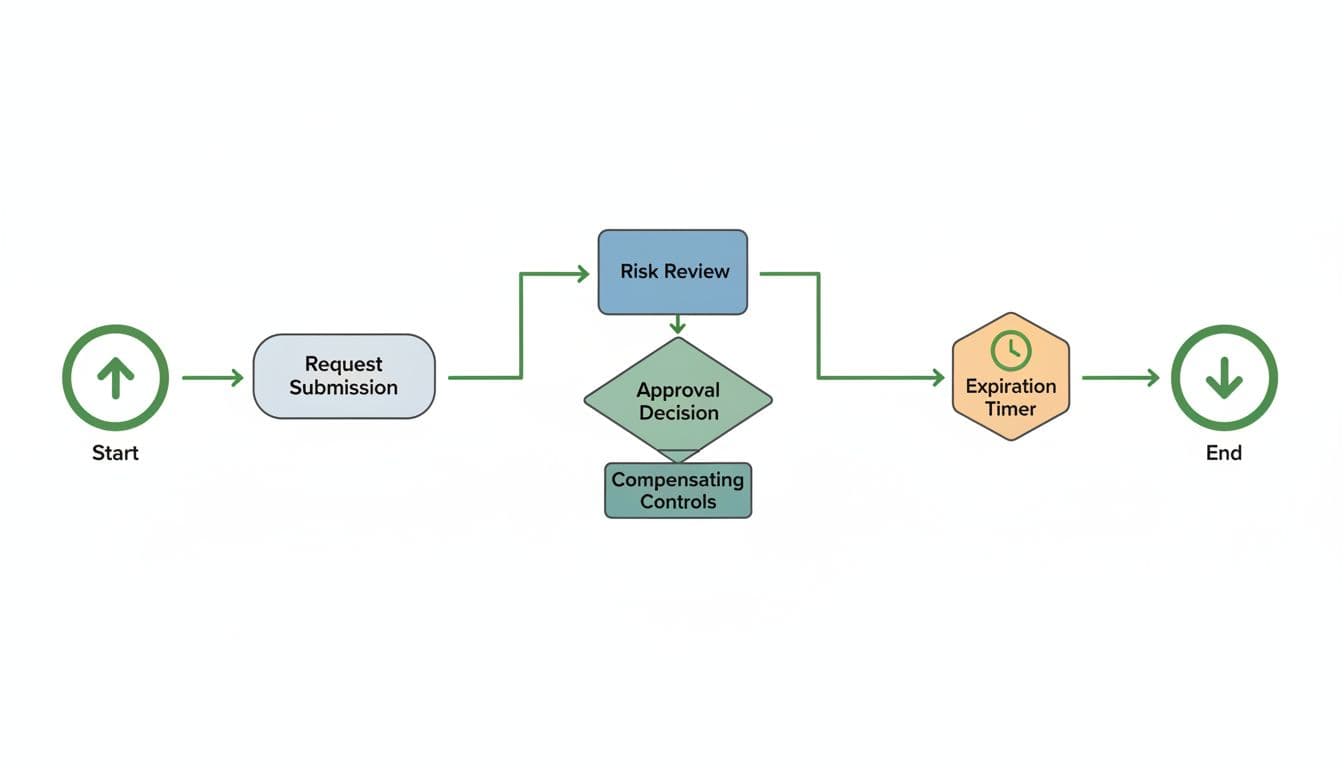
Steps: Submit, triage by type, risk review, decide, notify.
Business owners justify. Security assesses. Risk owners approve compensating controls.
Set time-bound rules. Approvals under 48 hours for most. Use SLAs: 24 hours for urgent, five days for standard.
Integrate with ITSM tools. Notifications keep momentum.
For ISO 27001 alignment, document every step. This guide on frameworks maps exceptions to controls.
Periodic recertification: Auto-remind at 75% of expiration. Retire or extend with fresh justification.
Exceptions stay rare because teams fix root causes. Track patterns to inform policy updates.
Enforce Recertification and Retirement
Exceptions don’t last forever. Build in reviews every 90 days. Risk owners confirm controls still work.
Send reminders two weeks early. If no response, auto-close and revert.
For chronic cases, like old firewall rules, escalate to engineering for fixes.
Audit-ready records matter for SOC 2. Store all in a central repo. Exportable for compliance.
Use a checklist for reviews:
- Controls effective?
- Justification still valid?
- Better options available?
This closes the loop. Teams trust it because risks don’t pile up.
Reference enterprise policy tips for expiry best practices.
Track and Measure Success with KPIs
Metrics prove value. Monitor these four:
- Exception volume (monthly count)
- Average approval time (hours)
- Overdue exceptions (% of total)
- Compensating controls coverage (%)
Target: Under 5% of assets excepted. Approvals in two days. Zero open-ended cases.
Dashboards in tools like Tableau or Power BI help.

Review quarterly. High volume signals policy gaps. Slow approvals need workflow tweaks.
Share wins with leadership. Low overdue rates show control.
Key Takeaways
A solid security exception process requires business buy-in, simple forms, fast workflows, and strict metrics.
Teams use it when friction drops and risks stay visible.
Start small. Pilot with one team. Scale with data.
Need help implementing? Book a Discovery Call with Bud Consulting to strengthen your security culture.




