table of contents
Multi-tenant SaaS platforms power modern businesses. They let customers share infrastructure while keeping data separate. Yet breaches in these setups jumped 300% from 2023 to 2025. Misconfigurations alone cause over half of incidents, often exposing multiple tenants at once.
You manage security across shared environments. Alert fatigue hits hard when tools flood teams with noise. CTEM workflows fix this. They scope assets, assess risks, prioritize threats, validate findings, and mobilize fixes continuously.
These processes cut mean time to remediate below 48 hours. Let’s break down how to build them right for your SaaS stack.
Understanding CTEM Workflows in SaaS
CTEM stands for Continuous Threat Exposure Management. It runs in five phases: scope, assess, prioritize, validate, and mobilize. In multi-tenant SaaS, this means scanning shared platforms like Slack or Salesforce without disrupting customers.
Start with scoping. Map all assets per tenant. Use APIs from providers for quick visibility. For example, pull configs from AWS or Google Workspace. This avoids blind spots in shared databases.
Assessment follows. Check for misconfigs, over-privileged accounts, or weak MFA. Tools flag 15,787 risky shares per hour in apps like Google Drive. Prioritize based on exploitability, not just CVEs.
Validation confirms real risks. Run automated tests to cut false positives by 80%. Then mobilize. Auto-create tickets in Jira or ServiceNow. Assign to platform, product, or security teams.
Platforms like IONIX handle this end-to-end. They map subsidiaries and push fixes with guides. In 2026, full automation covers all phases, reducing handoffs.
SaaS providers adopt multi-tenant CTEM tools. Zafran scales on AWS with GovCloud support. This isolates tenant data via row-level security.
Core Components of CTEM Workflows
Every CTEM workflow follows the five-phase cycle. Scoping identifies assets. Assessment scans for vulnerabilities. Prioritization ranks by business impact. Validation tests exploits. Mobilization triggers fixes.
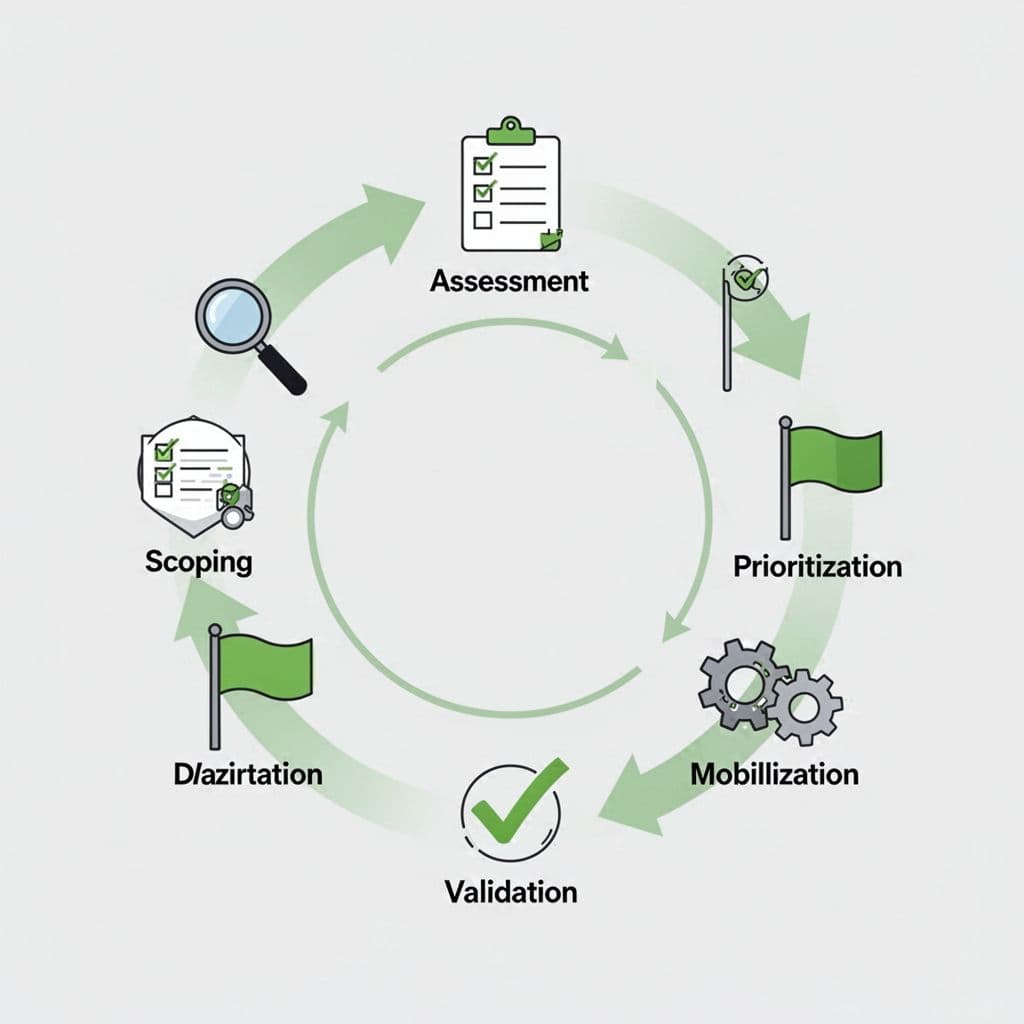
Build around integrations. Connect to your IdP for identity paths. Link to ticketing for mobilization. Use serverless scans to handle scale. Cache results per tenant for fast reads.
In multi-tenant setups, add tenant IDs to every alert. This ensures isolation. For instance, a Slack misconfig in one tenant doesn’t alert others.
Governance ties it together. Define SLAs like 48-hour remediation. Enforce via workflows. Tools like Vectra AI predict breaches with cross-team routing.
Example pattern: Daily external attack surface scans. Auto-prioritize high-risk tenants. Validate with GenPT simulations. Route to DevOps for patches.
This setup covers 90% of assets, per Gartner goals. It beats point-in-time audits.
Challenges of Multi-Tenant SaaS Security
Shared environments amplify risks. One tenant’s flaw can leak data across boundaries. Over-privileged access affects 85% of users. Hackers pivot easily with stolen API keys.
Breaches target cloud data in 82% of cases. MFA fails in 84% of adversary-in-the-middle attacks. The 2025 Salesloft incident stole OAuth tokens from 700 firms.
Noisy neighbors add issues. Heavy usage from one customer slows scans. Manual fixes lag in fast DevSecOps pipelines.
Alert fatigue worsens it. Security teams drown in unvalidated noise. Without prioritization, nothing gets fixed.
Multi-tenant designs help tools like AttackIQ. They offer delegated admin. Tenants manage their scans. Providers see anonymized trends.
Still, custom code tempts for scale. Avoid it. Use CQRS for performance. Serverless cuts costs.
For pilot domains, pick SaaS tenants with API access. CTEM.org’s getting started guide lists when it works best.
Designing Workflows to Cut Alert Fatigue
Noise kills response. Reduce it with validation upfront. Confirm 80% of risks before alerts. Use AI-driven tests like GenPT.
Set filters by tenant risk score. Low-impact misconfigs skip escalation. Focus on exploitable paths.
Workflow pattern: Scope daily. Assess with threat intel. Prioritize via business context. Validate exploits. Mobilize only confirmed items.
Integrate with SIEM. Tag alerts by phase. Track false positive rates.
Example: In Salesforce, flag over-privileged roles. Validate if they lead to data access. If not, archive. This drops volume 60%.
Use dynamic thresholds. Adjust for tenant size. Small customers get lighter scans.
Automation shines here. IONIX auto-mobilizes with how-to guides. Cuts delays 80%.
Teams see fewer, better alerts. Response improves.
Mapping Exposures to Business Risk
Raw vulnerabilities mislead. Map them to impact. Score by asset criticality and exploit likelihood.
Assign business context. Tag tenants by revenue or sensitivity. A config flaw in a high-value tenant scores higher.
Use risk formulas. Multiply CVSS by business weight. Add tenant factor.
Workflow step: During prioritization, query CMDB for context. Pull revenue data. Adjust scores.
Example table for quick reference:
| Exposure Type | Business Mapping Factor | Example Impact |
|---|---|---|
| Over-Privileged API | Tenant revenue >$1M | High: Pivot risk |
| Misconfig Share | PII data present | Medium: Leak potential |
| Weak MFA | All tenants | Low: If validated bypass absent |
After the table, correlate to KPIs. Track risk reduction quarterly.
This ties security to board metrics. Execs care about dollar loss.
Tools like CyCognito build ASM foundations. They score by real-world paths.
Coordinating Remediation Across Teams
Platform teams own infra. Product teams handle apps. Security validates. Workflows bridge them.
Auto-route by exposure type. Infra misconfigs to cloud engineers. App issues to devs.
Use RBAC in workflows. Security views all. Teams see assigned items.

Pattern: Create Jira epic per finding. Sub-tasks for validate, fix, retest. SLAs enforce deadlines.
Slack notifications ping owners. Dashboards show progress.
In SaaS, delegate to tenant admins for low-risk items. Escalate criticals centrally.
Zafran’s AWS setup supports this. It handles multi-cloud with step-by-step remediation.
Cross-team KPIs track handoffs. Aim for 90% on-time closure.
This coordination halves MTTR.
Governance Recommendations for CTEM
Policies guide workflows. Mandate 90% asset coverage. Require weekly reviews.
Define roles. Security owns scoping. Platform owns fixes.
Audit trails matter. Log every phase for compliance like SOC 2.
Enforce via gates. No deploy without CTEM sign-off.
For multi-tenant, set isolation rules. Tenant data stays segmented.
Review cycles quarterly. Adjust based on breach trends.
Strobes’ CTEM overview details unified execution.
Start small. Pilot one tenant. Scale with evidence.
Governance builds trust.
Measuring CTEM Success with KPIs
Track what matters. Mean time to remediate (MTTR) under 48 hours. Vulnerability remediation rate above 90%.
False positive rate below 20%. Asset coverage at 95%.

Business KPIs: Risk score reduction 30% yearly. Breaches avoided via simulations.
| KPI | Target | Measurement |
|---|---|---|
| MTTR | <48 hours | Ticket close time |
| Coverage | 95% | Assets scanned |
| Validation Rate | 80% confirmed | Tests passed |
| Remediation Rate | 90% | Fixes verified |
Siemba’s metrics guide adds PTaaS for depth.
Dashboards aggregate per tenant. Report to leadership.
These numbers prove value.
Conclusion
CTEM workflows transform SaaS security. They prioritize real risks and speed fixes across teams. Breaches drop when you validate and mobilize continuously.
Focus on the five phases. Map to business impact. Measure with clear KPIs.
Your multi-tenant platform stays secure. For tailored setup, book a discovery call with Bud Consulting. Start reducing exposures today.